App Store screenshot localization, without rebuilding the set
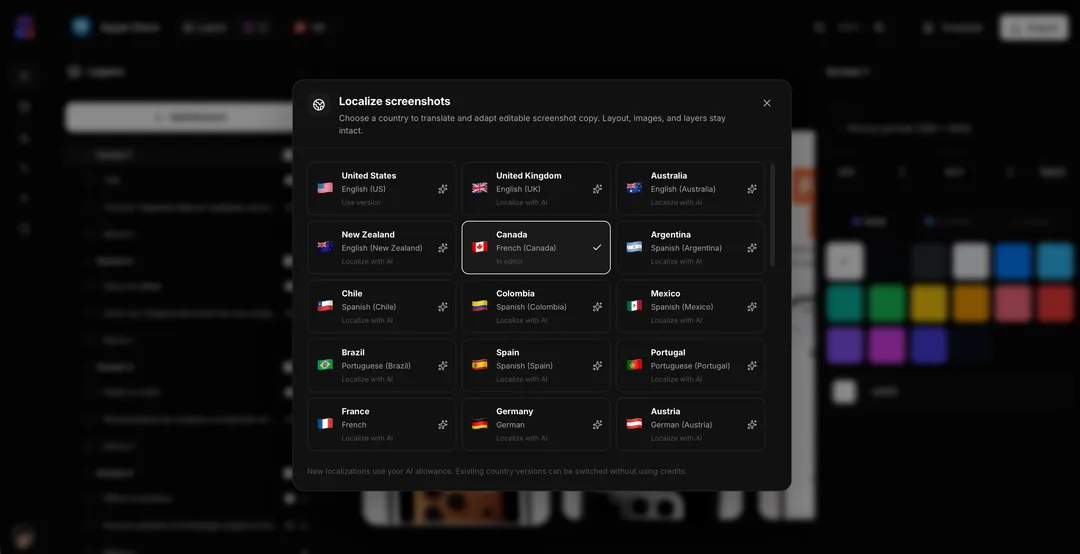
Design one editable screenshot set, then generate localized titles, subtitles, and captions for 42 App Store locales. Layouts, device frames, and real app screens stay put.
How it works
Finish the English master
Upload real app captures, set frames, and lock the visual story in the canvas. Localization starts from a working set, not a blank template.
Pick a market
Choose a locale. AI translates and adapts screenshot headlines and custom text for that storefront, including longer German or shorter Japanese lines.
Review and export
Fine-tune any string on the canvas, then export store-ready sizes for App Store Connect and Google Play.
What you get
42 locales, not a translation dump
AppGrowthKit covers App Store storefronts from the US and Japan to Brazil, Germany, and Saudi Arabia. Copy is generated for screenshot overlays, then you edit it like any other layer.
Layouts stay yours
Device frames, screenshots, and spacing do not reset per language. You review overflow and type size instead of rebuilding the composition.
Same export pack you already use
Localized sets download in the pixel sizes Apple and Google require. No second tool for iPhone, iPad, or Android.
What changes per locale, and what stays
Screenshot localization is not 42 new design files. Frames, device, and the captured UI stay. Headlines and custom text change, then you fix wrapping on the same layers and export the store sizes you already use.
| Piece | Per locale | What you review |
|---|---|---|
| Frames and screenshots | Unchanged | One master composition |
| Headlines and custom text | Translated | Overflow, especially German and Japanese |
| Export pixels | Unchanged | Apple and Play sizes do not depend on language |
| Coverage | 42 App Store locales | English master is the source |
Apple: upload screenshotsApp Store screenshot generatorPlay Store screenshot generator
42 App Store locales
Screenshot copy can be generated and edited for every storefront below. English masters stay the source; each locale is a reviewable version on the same layers.
Questions
AppGrowthKit localizes editable screenshot copy across 42 App Store locales, including major English, Spanish, Portuguese, German, French, Japanese, Korean, Chinese, Arabic, and more storefronts.
No. AI writes new titles, subtitles, and custom text onto the same layers. Your frames, app screens, and composition stay in place so you can fix wrapping without starting over.
Shotlingo is built around localization-first screenshot production. AppGrowthKit is a screenshot and icon workspace that includes localization: AI adapts copy for 42 locales inside the same canvas you use to design and export the set.
Yes. Every localized string stays a normal text layer. Change wording, size, or placement before you export.
Related generators
Translate the set. Keep the design.
Localize screenshot copy for the markets you ship, then export store-ready sizes with Launch Pass or Pro.